
 I have tried different players for movies, music, but ever since I have used VLC. I have not switched back from it. VLC is magnificent media player, providing support for almost all the media files and most important its easy to use interface. I have even used VLC for development purpose on LINUX. Where I have used VLC as a server as well as a client, not many might have used these features of VLC player but the support for streaming is excellent. VLC can also be used as a plug-in in HTTP page (just like we use plug-in for flash media), so providing the player capabilities through the HTTP interface.
Main Features of VLC player which I liked most are:
1)Â Â Â Â Extracting video and audio tracks from a video clip
2)    Set volume level up to ‘400’ where other players provide this up to ‘200’.
3)Â Â Â Â Easy and extremely useful shortcuts.
4)Â Â Â Â Streaming capabilities(normal one to one, and Broadcast method), with different protocols
5)Â Â Â Â Plug-in support for HTTP interface
6)    Support for maximum audio/video codec’s
7)Â Â Â Â Support for capturing input from TV source( this one I was not able to try)
8)Â Â Â Â Command line interface for player
9)    Providing support for using a ‘Subtitles’ file.Â
Using VLC player to separate Video and Audio portions of a Video Clip.
- Open VLC player
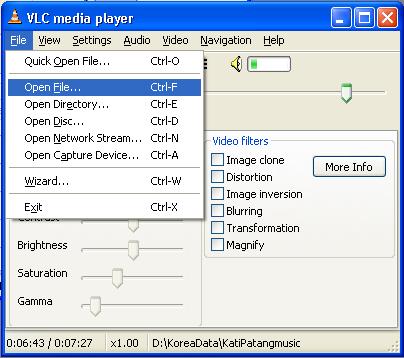
- From the File Menu, Choose ‘Open’ option to open a fileÂ
- Adjacent to Open “Drop down Menu†there is a “Browse†Button, Press this and select the video file from which you want to extract music.
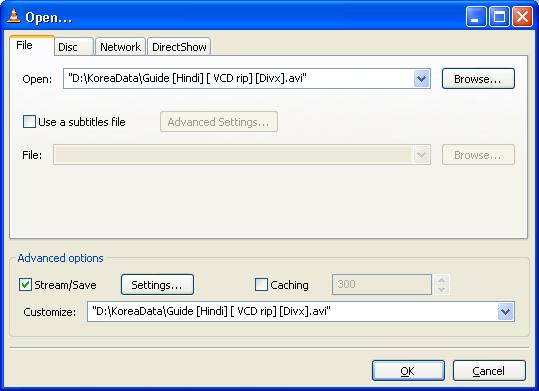
- In the Advance Option, Click “Settingsâ€.
- Enable ‘File’ by Clicking, Choose File location where you want to save the Music Trace by pressing ‘Browse’ Button.
- From the Encapsulation Method choose ‘mp4’ you can choose others also depending upon your need.
- From the Transcoding option ‘Choose Audio Codec’ ‘mp3’.
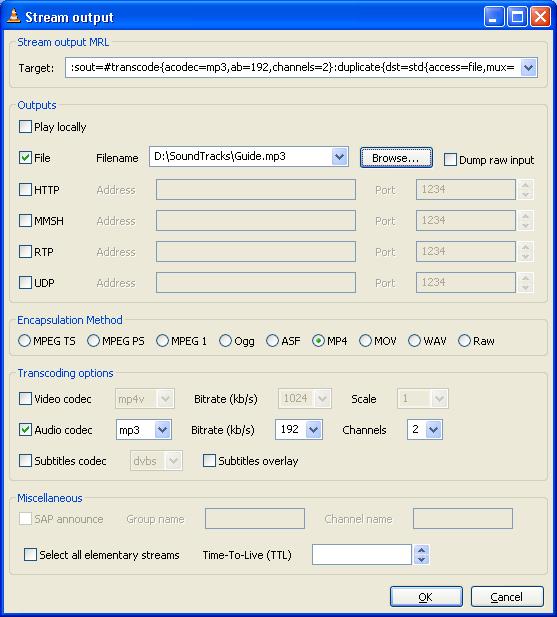
- And then Press ‘OK’.
Â
Let the player play the file. At the end the file with only the music track would be saved at the location specified.
Some of the important shortcuts for VLC Player, this is configurable with a list of other shortcuts also. You can browse the list from the “Settings->Preferencesâ€
Switch to FullScreen        : Press ‘f’
Play/Pause                               : Press ‘Space Key’
Jump Left                                 : Ctrl + ‘Left Arrow Key’
Jump right                               : Ctrl + ‘Right Arrow Key’
Quit                                              : Press ‘q’
Volume Up                               : Ctrl + ‘Up Arrow Key’
Volume Down                        : Ctrl + ‘Down Arrow Key’
Mute                                              : Press ‘m’
The VLC media player can be downloaded from: http://www.videolan.org
Â